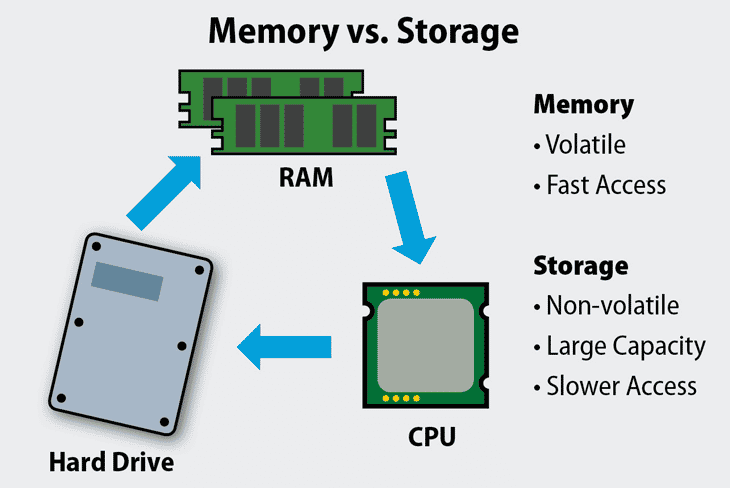


Memory is temporary, fast, and volatile (like RAM), used by the CPU to actively process data. Storage is long-term, slower, and non-volatile (like hard drives and SSDs), used for saving files and programs permanently. Think of memory as a workspace for quick tasks, and storage as a filing cabinet for keeping things long-term.
Memory (RAM):
- Function: Holds data and instructions that the CPU is actively working on.
- Speed: Very fast, allowing for quick access by the processor.
- Capacity: Typically has a smaller capacity compared to storage.
- Volatility: Volatile, meaning data is lost when the power is turned off.
- Example: When you open a program or file, it’s copied from storage into memory for the CPU to use.
Storage:
- Function: Stores all files, programs, and the operating system for the long term.
- Speed: Slower than memory, as it often involves mechanical parts (like a hard drive) or a longer access process.
- Capacity: Much larger capacity than memory.
- Volatility: Non-volatile, meaning data is retained even when the power is off.
- Example: Your hard drive or SSD where your documents, photos, and applications are saved.
How they work together?
- When you open an application, it’s loaded from the storage drive into memory.
- The CPU processes data in memory.
- When you save a file, the data is copied from memory back to storage.
- If you run out of memory, the system may slow down because it has to move data between the faster memory and the slower storage drive.
What is storage and memory?
Memory is short-term, temporary storage for active data, like the RAM in a computer, which holds information for the CPU to access quickly. Storage is long-term, permanent storage for files, applications, and the operating system, such as a hard drive or solid-state drive (SSD). Memory is volatile, meaning its data is lost when power is off, while storage is non-volatile and keeps data even after a power cycle.
Memory (RAM):
- Purpose: Acts as a temporary workspace for the CPU, holding data and programs that are currently being used.
- Speed: Very fast, allowing for quick access and manipulation of data.
- Volatility: Volatile, meaning data is erased when the computer is turned off.
- Capacity: Generally has a smaller capacity than storage.
Storage (Hard Drives, SSDs):
- Purpose: Stores all your files, applications, and the operating system for long-term access.
- Speed: Slower than memory, especially with traditional hard drives.
- Volatility: Non-volatile, so data remains even when the computer is powered down.
- Capacity: Typically has a much larger capacity than memory.
What are the 4 types of storage?
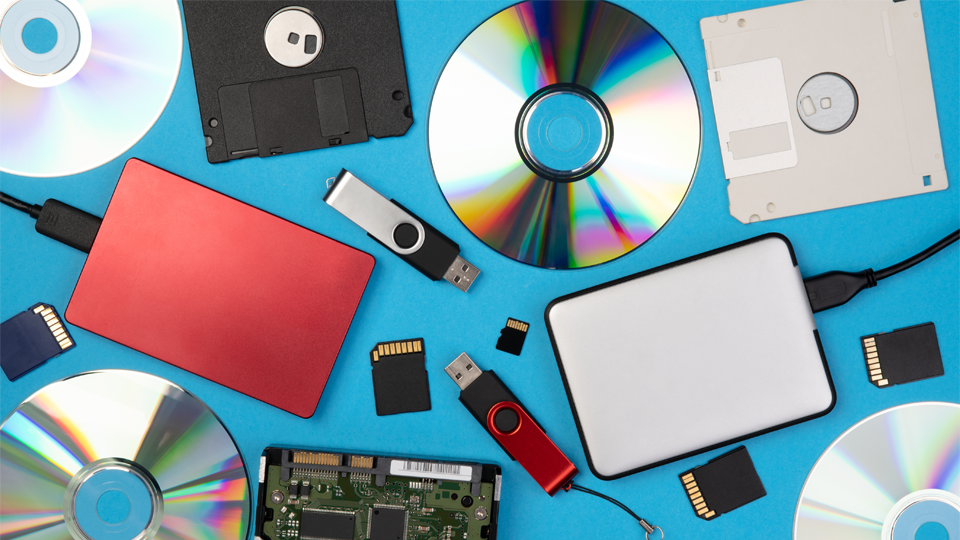
There are several types of storage devices available. The most common ones include hard disk drives (HDDs), solid state drives (SSDs), universal serial bus (USB) flash drives, memory cards, and network-attached storage (NAS) devices.
What is an example of memory and storage?
To understand how memory and storage work together, consider this analogy: Imagine your computer as an office. The desk represents RAM, while the filing cabinet represents storage. When you’re actively working on a project, you keep relevant documents on your desk for quick access (RAM).
What is the difference between main memory and storage?
Memory is what your computer uses to store data temporarily, while storage is where you save files permanently. When you save a file, it’s copied from the memory onto the storage drive. This is why your computer seems to run slower when it’s low on memory; it has to pull data from the storage drive in order to use it.
What are three types of memory storage?

The three memory stores are sensory memory, short-term memory, and long-term memory. Sensory memory holds incoming information from your senses for a very brief period, while short-term memory acts as a temporary workspace for information that requires attention. Long-term memory serves as a more permanent storage for information that can be retrieved later.
- Sensory Memory: This is the initial, brief storage of sensory information from the environment (sight, sound, etc.). It has a high capacity but a very short duration, and information decays quickly if not attended to.
- Short-Term Memory (STM): Information from sensory memory that is paid attention to moves to short-term memory. It has a limited capacity and duration (typically seconds to minutes), and it serves as a temporary holding place for information needed for a current task.
- Long-Term Memory (LTM): If information from short-term memory is rehearsed or encoded deeply, it can be transferred to long-term memory. LTM has a virtually unlimited capacity and can store information for years.
What is the definition of storage?
the act of storing : the state of being stored. especially : the safekeeping of goods in a depository (such as a warehouse) b. : the price charged for keeping goods in a storehouse.
What are 5 storage devices?

Five storage devices are the hard disk drive (HDD), solid-state drive (SSD), USB flash drive, memory card, and cloud storage. Other examples include optical discs like CDs and DVDs, floppy disks, and magnetic tapes.
- Hard Disk Drive (HDD): A traditional storage device that stores large amounts of data on spinning magnetic platters inside a computer.
- Solid-State Drive (SSD): A faster and more durable storage device that uses flash memory chips instead of moving parts.
- USB Flash Drive: A small, portable, and removable device for transferring and storing data via a USB port.
- Memory Card: A small storage card, often found in cameras and smartphones, used to store photos, videos, and other data.
- Cloud Storage: A service that stores data on remote servers accessed via the internet, allowing access from multiple devices.
Before installing a computer you should know the above facts. Hope this post helps you a lot.
Reference link: