

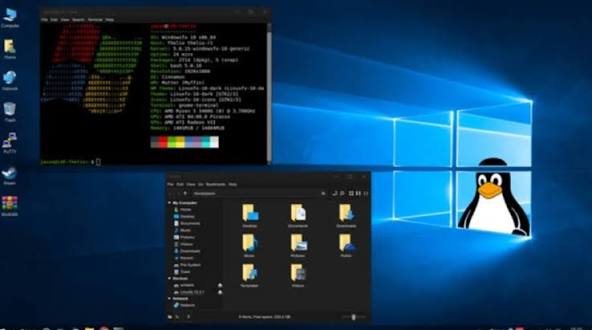
Linux is a free, open-source, Unix-like operating system kernel first released by Linus Torvalds in 1991. It is renowned for its stability, security, and versatility, powering everything from supercomputers and web servers to Android smartphones and IoT devices. Linux operates on a modular, multi-user, and multitasking design, often bundled with software in “distributions” (distros) like Ubuntu, Fedora, or Mint.
Key Aspects of Linux Operating System>>
- Open Source & Free: Developed collaboratively, it is generally free to use, modify, and distribute under the GPL license.
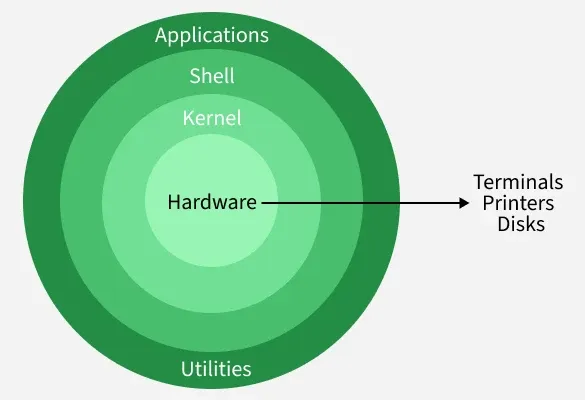
- Architecture: At its core is the kernel, which interacts directly with hardware, managing memory, CPU time, and peripherals. User applications interact with the kernel through the shell or graphical desktop environments.
- Distributions (Distros): Because the kernel is just one part of the OS, it is packaged with tools, libraries, and desktop environments (GNU components) to create a complete operating system.
- Key Features:
- Security: Features robust permissions, process isolation, and fast patching.
- Stability: Highly reliable, often running for years without reboots.
- Versatility: Runs on diverse hardware, from embedded devices to massive servers.
- Common Use Cases: Dominant in server environments (web, database), software development, and as the foundation for Android.
Components of the System>>
- Kernel: Core of the system, managing hardware.
- Shell: Command-line interface for user interaction.
- System Utilities: Tools for managing files, processes, and applications.
- Desktop Environment: Graphical interface (e.g., GNOME, KDE).
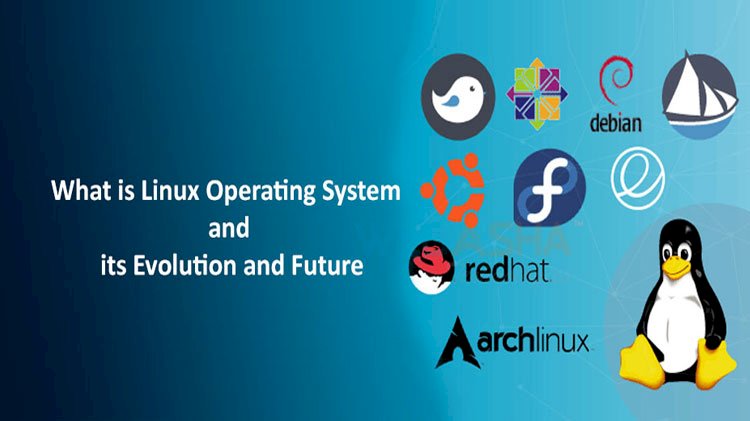
Popular Linux distributions include Ubuntu, Fedora, Debian, and Arch Linux.
Introduction to Linux
- Linux is based on the UNIX operating system. UNIX is a powerful, multi-user, multitasking operating system originally developed in the 1970s at AT&T Bell Labs. It laid the foundation for many modern operating systems, including Linux.
- Linux is free and open-source, accessible to everyone.
- This promotes global collaboration and innovation.
- Linux offers efficient performance and strong security.
- It works well across many devices and industries.
Linux combines a wide range of open-source tools and components to form a complete computing environment. These components include file systems, user interfaces, system utilities, and application programs all working together to manage hardware and enable users to interact with their computer systems.
Distributions in Linux:
A Linux distribution is a complete operating system built around the Linux kernel, combined with system software, libraries, and applications. It provides users with everything needed to run Linux on different types of devices.
- A distribution includes the Linux kernel, system libraries, and essential software tools.
- Different distributions are designed for different purposes such as desktops, servers, and embedded systems.
- Each distro comes with its own package manager, desktop environment, and default applications.
- Users can choose distributions based on performance, stability, ease of use, or customization level.
Popular Linux Distributions:
Around 600 + Linux Distributions are available and some of the popular Linux distributions are:
- Ubuntu: Ubuntu is a user-friendly Linux distribution mainly used for beginners, desktops, servers, and cloud computing.
- Debian – A stable and reliable Linux distribution, Debian is widely used for servers and serves as the base for many other distributions.
- Kali Linux – A security-focused Linux distribution used for penetration testing, ethical hacking, and digital forensics, Kali Linux.
- MX Linux – MX Linux is a lightweight and fast Linux distribution designed for older hardware with good stability and performance.
- Manjaro – A user-friendly Arch-based Linux distribution used for rolling updates and access to the latest software, Manjaro.
- Linux Mint – A beginner-friendly Linux distribution, Linux Mint, is designed to be simple and familiar for Windows users.
- Solus – Solus is a modern, independent Linux distribution focused on desktop performance and simplicity.
- Fedora – A cutting-edge Linux distribution used by developers to work with the latest technologies, Fedora
- openSUSE – A powerful Linux distribution, openSUSE, is used for system administration, development, and enterprise environments.
- Deepin – Deepin is a visually attractive Linux distribution focused on ease of use and a polished desktop experience.
Importance of Linux:
Linux is a free, open-source operating system known for its flexibility, stability, and strong security. It is widely used in personal computing, server environments, and enterprise systems because of its performance and customization capabilities.
- Offers high security and stability, making it ideal for servers and development work.
- Fully open-source and free to use, modify, and distribute.
- Highly flexible and customizable to suit different user and industry needs.
- Supported by a large global community and a vast software ecosystem.
Architecture of Linux:
Linux architecture refers to the layered structure of the Linux operating system that defines how its components – such as the kernel, shell, system libraries, and hardware – interact with each other to manage system resources and execute user programs efficiently. It has the following components:
1. Kernel>
The kernel is the core of the Linux operating system that manages hardware resources and controls communication between software and hardware.
- Handles process management, memory, and device control.
- Prevents conflicts between multiple running programs.
Types of Kernels: Monolithic, Microkernel, Hybrid, Exokernel
2. System Libraries>
System libraries provide essential functions that allow applications to interact with the kernel without needing to access it directly.
- Contain reusable pre-written code for common system operations.
- Act as an interface between applications and the Linux kernel.
3. Shell>
The shell is the command-line interface that allows users to communicate with the operating system by entering commands.
- Interprets and executes user commands.
- Acts as a bridge between user actions and kernel processing.
4. Hardware Layer>
The hardware layer consists of physical components that execute commands and provide system resources.
- Includes CPU, RAM, storage, and input/output devices.
- Communicates with the OS using device drivers and kernel services.
5. System Utilities>
System utilities are built-in tools that help users manage, configure, and maintain the operating system.
- Used for tasks like software installation, user management, and monitoring.
- Simplify system administration processes for both beginners and administrators.
Applications of Linux Operating System:
The Linux operating system is widely used across multiple domains due to its flexibility, strong security, and open-source nature. It supports a wide range of applications across different industries, as outlined below.
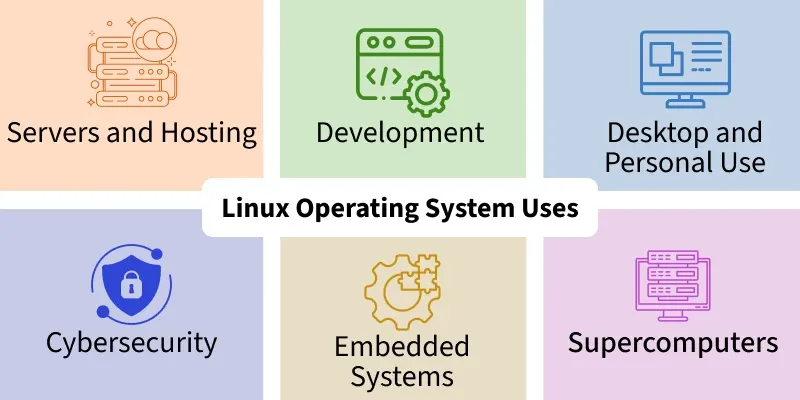
1. Servers and Hosting>
- Powers most web servers, cloud platforms, and data centers worldwide.
- Offers high stability, security, and uptime for critical services.
2. Development>
- Provides powerful tools and environments for coding, testing, and debugging.
- Supports multiple programming languages and frameworks.
3. Desktop and Personal Use>
- Offers customizable and secure desktop environments.
- Supports daily computing tasks like browsing, office work, and media usage.
4. Cybersecurity>
- Widely used for ethical hacking and penetration testing (e.g., Kali Linux).
- Provides advanced tools for threat detection and security analysis.
5. Embedded Systems>
- Runs efficiently on low-resource devices like IoT and routers.
- Supports real-time processing and hardware-level control.
6. Supercomputers>
- Used in high-performance computing environments worldwide.
- Handles massive scientific calculations and simulations efficiently.
7. Education>
- Helps students learn programming, networking, and system administration.
- Free and open-source, making it ideal for academic institutions.
Selecting a Linux Distribution Based on Your Requirements:
Selecting a Linux distribution depends on your personal needs, experience level, and the purpose for which you want to use the operating system. Different distributions are designed for tasks like development, security, servers, or everyday desktop use, offering flexibility and customization for every type of user.
For Beginners>
- Ubuntu provides an easy-to-use interface with strong community support for new users.
- Linux Mint offers a Windows-like experience, making it comfortable for first-time Linux users.
For Advanced Users>
- Arch Linux is known for minimalism and deep system customization.
- Gentoo allows full control over system configuration but requires advanced knowledge.
For Developers>
- Fedora offers the latest development tools and technologies.
- Debian is highly stable with a large software repository for development and production.
For Servers>
- CentOS provides enterprise-level stability similar to Red Hat Enterprise Linux (RHEL).
- Ubuntu Server is popular for its ease of use and strong community support.
For Lightweight Systems>
- Lubuntu is optimized for low-resource systems and older hardware.
- Puppy Linux is extremely lightweight and runs well on very old computers.
For Security Professionals>
- Kali Linux is designed for penetration testing and ethical hacking with pre-installed security tools.
- Used widely for cybersecurity training, vulnerability assessment, and digital forensics.
Installing Linux:
Selecting a Ubuntu, Fedora, or Linux Mint distribution which suits your needs is the initial step in the straightforward procedure for installing Linux.
Before installing Linux one should know about 5 basic components of Linux >>
The 5 basic components of a Linux system are the Hardware, Kernel, System Libraries, Shell, and System Utilities, forming layers from hardware interaction up to user applications, with the Kernel as the core managing everything, the Shell as the command interface, and Utilities performing specific tasks.
Here’s a breakdown of each component:
- Hardware Layer: The physical components like the CPU, memory (RAM), disks, and peripherals (keyboard, mouse) that the operating system manages.
- Kernel: The core of the OS, directly communicating with the hardware, managing resources, processes, memory, and I/O.
- System Libraries: Pre-written code (like the GNU C Library) that applications use to access kernel functions without needing direct kernel access, simplifying development.
- Shell: A command-line interpreter (like Bash) that acts as an interface, taking user commands and translating them for the kernel to execute.
- System Utilities: Programs and tools (like
ls,cp,grep) that perform essential tasks, manage files, and provide system functionality.
Usage Examples:
- Hardware: Your computer’s CPU, SSD, or printer.
- Kernel: Manages when an app uses the CPU or writes to disk.
- Libraries:
glibcprovides functions for programs to use memory or network sockets. - Shell: Typing
ls -lto list files in the terminal. - Utilities:
mkdirto create a directory ordfto check disk space.
What is the full form of Linux?
The full form of LINUX is Lovable Intellect Not Using XP. Linux was built by and named after Linus Torvalds. Linux is an open-source operating system for servers, computers, mainframes, mobile systems, and embedded systems.
To know more about Linux just click to reference link: https://www.google.com/search?q=about+linux+operating+system&rlz=1C1CHBD_en-GBIN1169IN1169&oq=About+Linux&gs_lcrp=EgZjaHJvbWUqDggAEEUYOxhDGIAEGIoFMg4IABBFGDsYQxiABBiKBTIGCAEQRRg5MgcIAhAAGIAEMgcIAxAAGIAEMgcIBBAAGIAEMgcIBRAAGIAEMgcIBhAAGIAEMgcIBxAAGIAEMgcICBAAGIAEMg0ICRAAGIYDGIAEGIoF0gEJMTE1NTRqMGo3qAIIsAIB8QVum_n6NdNSTvEFbpv5-jXTUk4&sourceid=chrome&ie=UTF-8